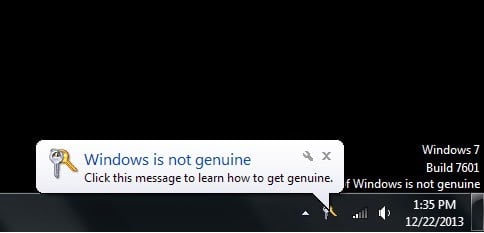
If the issue is caused by lack of permissions, to resolve you can either disable the policy setting (Method A), or edit the permissions to provide the Licensing Service the required permissions (Method B). If the issue is caused by missing registry keys, see Method C.
Method 1: Disable the Plug and Play Policy
1. Determine the source of the policy. To do this, follow these steps:
a. On the client experiencing the Activation error, run the Resultant Set of Policy wizard by clicking Start, Run and entering rsop.msc as the command.
b. Visit the following location:
Computer Configuration / Policies / Windows Settings /Security Settings / System Services /
If the Plug and Play service is configured through a Group Policy setting, you see it here with settings other than Not Defined. Additionally, you can see which Group Policy is applying this setting.
2. Disable the Group Policy settings and force the Group Policy to be reapplied.
a. Edit the Group Policy that is identified in Step 1 and change the setting to “Not Defined.” Or, follow the section below to add the required permissions for the Network Service account.
b. Force the Group Policy setting to reapply: gpupdate /force (a restart of the client is sometimes required)
Method 2: Edit the permissions of the Group Policy:
1. Open the Group Policy that is identified in Method A, Step 1 above, and open the corresponding Group Policy setting.
2. Click the Edit Security button, and then click the Advanced button.
3. In the Advanced Security Settings for Plug and Play window click Add and then add the SERVICE account. Then, click OK
4. Select the following permissions in the Allow section and then click OK:
Query template
Query status
Enumerate dependents
Interrogate
User-defined control
Read permissions
Note: The Previous rights are the minimum required permissions.
5. Run gpupdate /force after you apply the previous permissions to the Group Policy setting.
6. Verify that the appropriate permissions are applied with the following command:
sc sdshow plugplay
The following are the rights applied to the Plug and Play service in SDDL:
D:(A;;CCDCLCSWRPWPDTLOCRSDRCWDWO;;;SY)
(A;;CCDCLCSWRPWPDTLOCRSDRCWDWO;;;BA)
(A;;CCLCSWLOCRRC;;;IU)
(A;;CCLCSWLOCRRC;;;SU)
S:(AU;FA;CCDCLCSWRPWPDTLOCRSDRCWDWO;;;WD)
(A;;CC LC SW LO CR RC ;;;SU is an Access Control Entry (ACE) that allows the following rights to “SU” (SDDL_SERVICE – Service logon user)
A: Access Allowed
CC: Create Child
LC: List Children
SW: Self Write
LO: List Object
CR: Control Access
RC: Read Control
SU: Service Logon User
Note: If there are no GPO’s in place, then another activity may have changed the default registry permissions. To work around this issue, perform the following steps:
- On the computer that is out of tolerance, start Registry Editor.
- Right-click the registry key HKEY_USERS\S-1-5-20, and select Permissions…
- If the NETWORK SERVICE is not present, click Add…
- In Enter the object names to select type Network Service and then click Check Names and OK.
- Select the NETWORK SERVICE and Grant Full Control and Read permissions.
- Restart the computer.
- After the restart, the system may require activation. Complete the activation.
Method 3: Add Registry Key
1. Copy the below entry as is on a notepad and save the text file to Profilelist.reg
2. Merge profilelist.reg
3. Reboot the server and now try to activate , it should work fine.
—————————————————————————————————————————————————
Windows Registry Editor Version 5.00
[HKEY_LOCAL_MACHINE\SOFTWARE\Microsoft\Windows NT\CurrentVersion\ProfileList\S-1-5-18]
“Flags”=dword:0000000c
“State”=dword:00000000
“RefCount”=dword:00000001
“Sid”=hex:01,01,00,00,00,00,00,05,12,00,00,00
“ProfileImagePath”=hex(2):25,00,73,00,79,00,73,00,74,00,65,00,6d,00,72,00,6f,\
00,6f,00,74,00,25,00,5c,00,73,00,79,00,73,00,74,00,65,00,6d,00,33,00,32,00,\
5c,00,63,00,6f,00,6e,00,66,00,69,00,67,00,5c,00,73,00,79,00,73,00,74,00,65,\
00,6d,00,70,00,72,00,6f,00,66,00,69,00,6c,00,65,00,00,00
[HKEY_LOCAL_MACHINE\SOFTWARE\Microsoft\Windows NT\CurrentVersion\ProfileList\S-1-5-19]
“ProfileImagePath”=hex(2):43,00,3a,00,5c,00,57,00,69,00,6e,00,64,00,6f,00,77,\
00,73,00,5c,00,53,00,65,00,72,00,76,00,69,00,63,00,65,00,50,00,72,00,6f,00,\
66,00,69,00,6c,00,65,00,73,00,5c,00,4c,00,6f,00,63,00,61,00,6c,00,53,00,65,\
00,72,00,76,00,69,00,63,00,65,00,00,00
“Flags”=dword:00000000
“State”=dword:00000000
[HKEY_LOCAL_MACHINE\SOFTWARE\Microsoft\Windows NT\CurrentVersion\ProfileList\S-1-5-20]
“ProfileImagePath”=hex(2):43,00,3a,00,5c,00,57,00,69,00,6e,00,64,00,6f,00,77,\
00,73,00,5c,00,53,00,65,00,72,00,76,00,69,00,63,00,65,00,50,00,72,00,6f,00,\
66,00,69,00,6c,00,65,00,73,00,5c,00,4e,00,65,00,74,00,77,00,6f,00,72,00,6b,\
00,53,00,65,00,72,00,76,00,69,00,63,00,65,00,00,00
“Flags”=dword:00000000
“State”=dword:00000000
Method 4 : use these tools to activate Windows again
Windows Loader v2.2.2 by Dar is tool to activate your Microsoft Windows . It can activate Windows Vista, Windows 7 , Windows 8/8.1 and Windows 10 .
KMSPico is the most perfect activation tool to activate Windows & Microsoft Office (such as Office 2007 , 2010, 2013, 2016; Windows 7/8/8.1/10;…). All you have to do is just one click to activate.
Microsoft Toolkit is best tool for you to activate Microsoft Windows and Microsoft Office . It can activate includes Windows Vista, Windows 7 , Windows 8/8.1 and Windows 10. This tool also can activate Microsoft Office 2007, 2010, 2013 , 2016 .